


Reading a digital calibration certificate: the free DCC Viewer
What a Digital Calibration Certificate (DCC) is, why it comes as an XML file, and how to read, check and export it as a PDF with our free DCC Viewer.
Also available in: Deutsch
More and more calibration laboratories deliver their results as a Digital
Calibration Certificate, or DCC for short. The first encounter is usually
the same: an e-mail arrives with an .xml attachment, you open it, and you
see a wall of tags instead of a certificate. The data is all there, but it is
written for machines. This post explains what a DCC is, why it looks the way
it does, and how to read one in seconds with the
DCC Viewer, a free tool we built for
exactly this moment.
What is a Digital Calibration Certificate?
A calibration certificate documents that a measuring instrument was compared against a reference, what the deviations were, and with which uncertainty. For decades it has been a PDF or a sheet of paper. That is fine for reading, but every value that needs to go into an instrument database, a quality report or a control chart has to be typed off by hand.
The DCC replaces the paper with a structured XML file. The format was developed by the Physikalisch-Technische Bundesanstalt (PTB), Germany's national metrology institute, together with partners from industry and accredited laboratories. It is defined by a published XML schema, so a DCC from one laboratory has the same structure as a DCC from another and can be processed by software without any guesswork.
A DCC has two main parts:
- Administrative data: the laboratory, its accreditation, the customer, the item under test with its serial number, the responsible persons and the calibration date.
- Measurement results: the measured quantities, reference values, deviations and uncertainties. Quantities and units are expressed using the D-SI model, a machine-readable notation for SI units, so a value like "23.4 °C" carries its unit unambiguously.
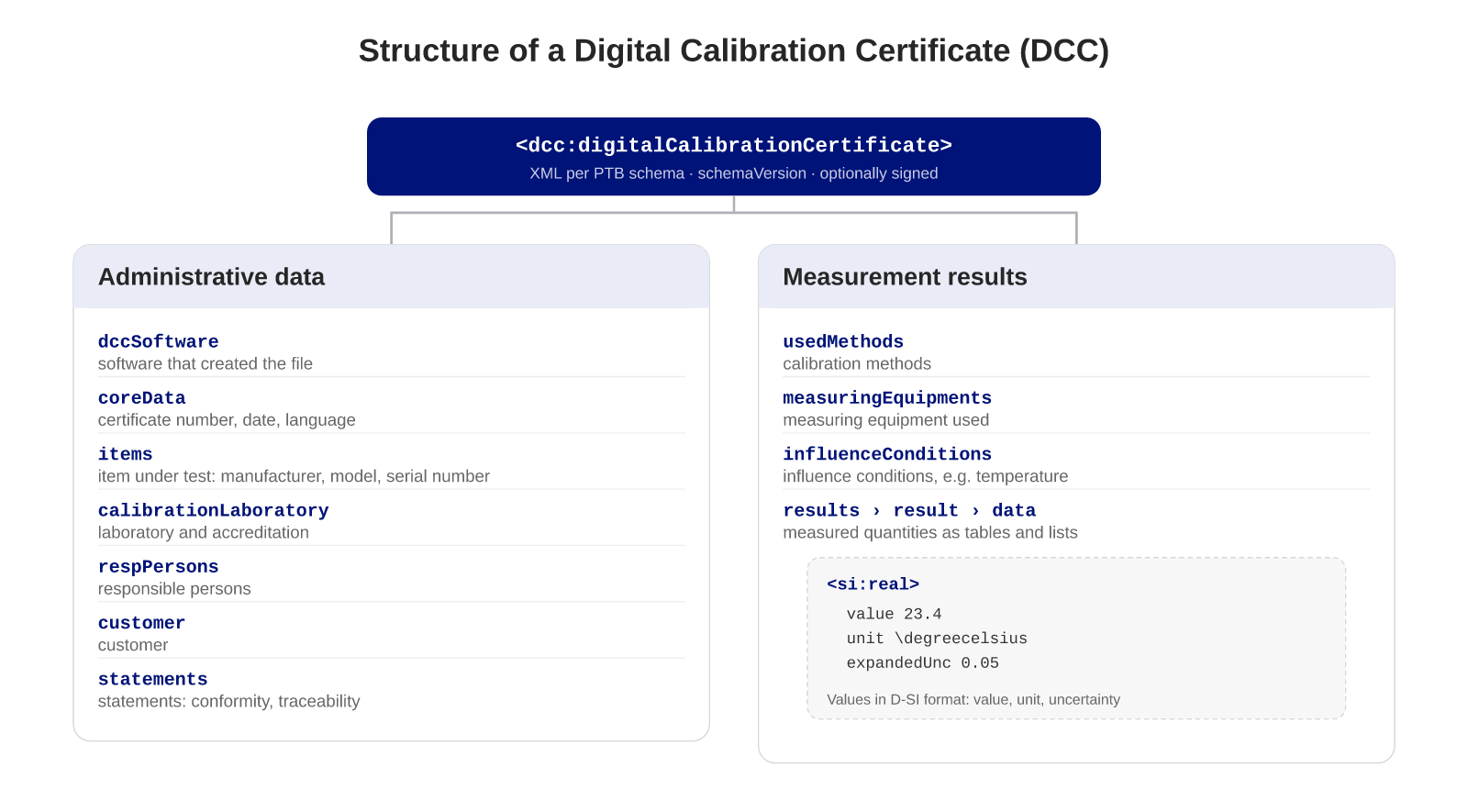
The schema is versioned. PTB publishes new releases as the format evolves, and every certificate states which version it was written against. A DCC can also carry a digital signature, which lets the recipient verify that the file is unchanged since the laboratory issued it.
Why this matters
The point of the DCC is not to make certificates harder to read. It is to make them usable by software:
- Measured values can flow directly into instrument management, quality systems or statistical evaluation, with no transcription errors.
- Expiry dates and conformity statements can be checked automatically.
- A certificate can be validated against the official schema, so a broken or incomplete file is detected on arrival rather than during an audit.
- Laboratories and customers exchange one file in one format, whatever systems they use.
For laboratories working under ISO/IEC 17025 and for companies with a large instrument inventory, this removes a lot of manual work. The catch is that the XML file itself is unreadable for humans. That is where a viewer comes in.
The DCC Viewer
The DCC Viewer is a free web application that turns a DCC into something you can read, check and hand on. There is no account and no sign-up. You open the page, drop the XML file onto it, and the certificate appears as structured blocks:
- certificate information and calibration laboratory,
- customer and item under test,
- responsible persons and statements of conformity,
- calibration methods, measuring equipment and influence conditions,
- the measurement results as data tables and as charts.
From these blocks you assemble your own report. Add the sections your documentation needs, leave out the ones it does not, and export the result as a PDF with one click. Laboratories use this to give customers a readable companion to the XML; customers use it to file a certificate the way they always have while keeping the machine-readable original.
A few details we consider important:
- The certificate is validated. The viewer reads the schema version declared in the file and checks the certificate against the matching official PTB schema, so any published DCC version is handled.
- Nothing is stored. The file is parsed in memory and discarded. It is never written to disk, and nothing is sent to an AI service or any other third party. Parsing is deterministic, which is what makes the tool usable for calibration data at all.
- Two languages, kept apart. The interface is available in English and German. The certificate content is shown in whichever languages the DCC itself declares, so a German user can read an English-only certificate with a German interface.
The viewer handles one file at a time. It is meant for the moment a certificate lands in your inbox, not for managing hundreds of them.
When one file is not enough
If you receive calibration certificates regularly, the next step is to keep them together with the instruments they belong to. That is what the digical app does: it stores DCCs alongside your instruments, validates them on upload, tracks expiry dates and sends an e-mail before a certificate becomes invalid. The report builder in the DCC Viewer is the same one you will find there.
Until then, the DCC Viewer is the quickest way to find out what is inside that XML attachment. Try it with your next certificate.
Frequently asked questions
Is a DCC the same as a PDF certificate with a digital signature?
No. A signed PDF is still a picture of a certificate that a person has to read. A DCC is structured XML in which every value, unit and uncertainty has its own field, so software can read it without any transcription. A DCC can carry a digital signature as well.
Which schema version does the DCC Viewer support?
The viewer reads the schema version declared in the file and validates against the matching official PTB release, so any published DCC version is handled.
Is my certificate uploaded or stored anywhere?
The file is parsed in memory on our server and discarded straight away. It is never written to disk, and nothing is sent to an AI service or any other third party.
Does the DCC Viewer cost anything?
No. It is free and needs no account. It handles one file at a time; for managing many certificates there is the digical app with a 14-day trial.
Can I keep the PDF and the XML?
Yes. Export the report as a PDF for your files and keep the XML as the machine-readable original. Auditors may ask for either.